In short
- Framework: Flutter
- Platform: Android (root)
- Backend: FastAPI + Gemini
Before you start scanning
Only scan networks and devices you own, or for which you have the owner's explicit written permission. Scanning someone else's infrastructure without permission is a crime in Poland (Articles 267 and 269a-269b of the Polish Criminal Code). The app is meant for auditing and education: it points out what's worth fixing and is not a tool for attacking or bypassing security.
Challenge
nmap is built for a full Linux with root, so a phone is an awkward home for it. Raw scan output, hundreds of lines of NSE scripts and bare CVE numbers, says little to anyone who isn't a specialist, and matching vulnerabilities by version number can produce false results. Showing “how to exploit it” would turn an audit tool into something else. The goal: a scan from the phone, results that make sense to a non-specialist, and a hard line between pointing out a weak spot and handing over an attack tool.
Solution
The app drives a Kali NetHunter in a chroot on rooted Android and builds commands only from fixed profiles. Users can't type their own flags, and NSE scripts are limited to safe categories, which leaves out those that send network addresses outside. After nmap, read-only layers run: whatweb, sslyze (TLS), ssh-audit, dig (DNS resolver), p0f, UPnP from the router and the phone's Wi-Fi security. Detected versions are checked against NVD, OSV.dev and the CISA KEV catalog. Exploit-DB is used only as metadata: an entry either exists or it doesn't, and nobody downloads its content. Only on the basis of these facts does the Gemini 3.1 Pro model write a description in Polish: what the vulnerability is, why it has that severity and how to verify it without touching the target. Code enforces the ban on describing attacks, and a separate validator rejects made-up CVE numbers.
Process
- Environment: Kali NetHunter in a chroot on a rooted phone, controlled from a Flutter app via su. No emulation.
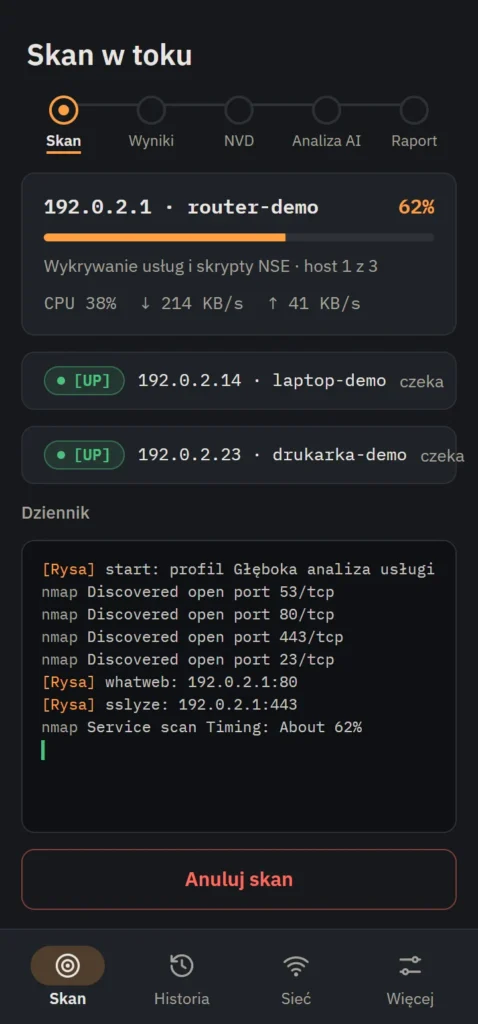
- Scan engine: nmap commands from a closed set of profiles, with time limits and live progress for each host (stage, CPU, network traffic).
- Audit layers (TLS, SSH, DNS and others) read what a service announces about itself, with no login attempts and no exploitation of vulnerabilities. CVE matching in NVD, OSV.dev and CISA KEV comes on top.
- Analysis and report: addresses in the data sent to the model are pseudonymized, Gemini describes the risk in Polish, a validator rejects hallucinations, and the result lands in a PDF report with a remediation plan.
- Fixes after live scans: repeated rounds on live networks, each fix with tests (over a thousand automated tests in the app and backend).
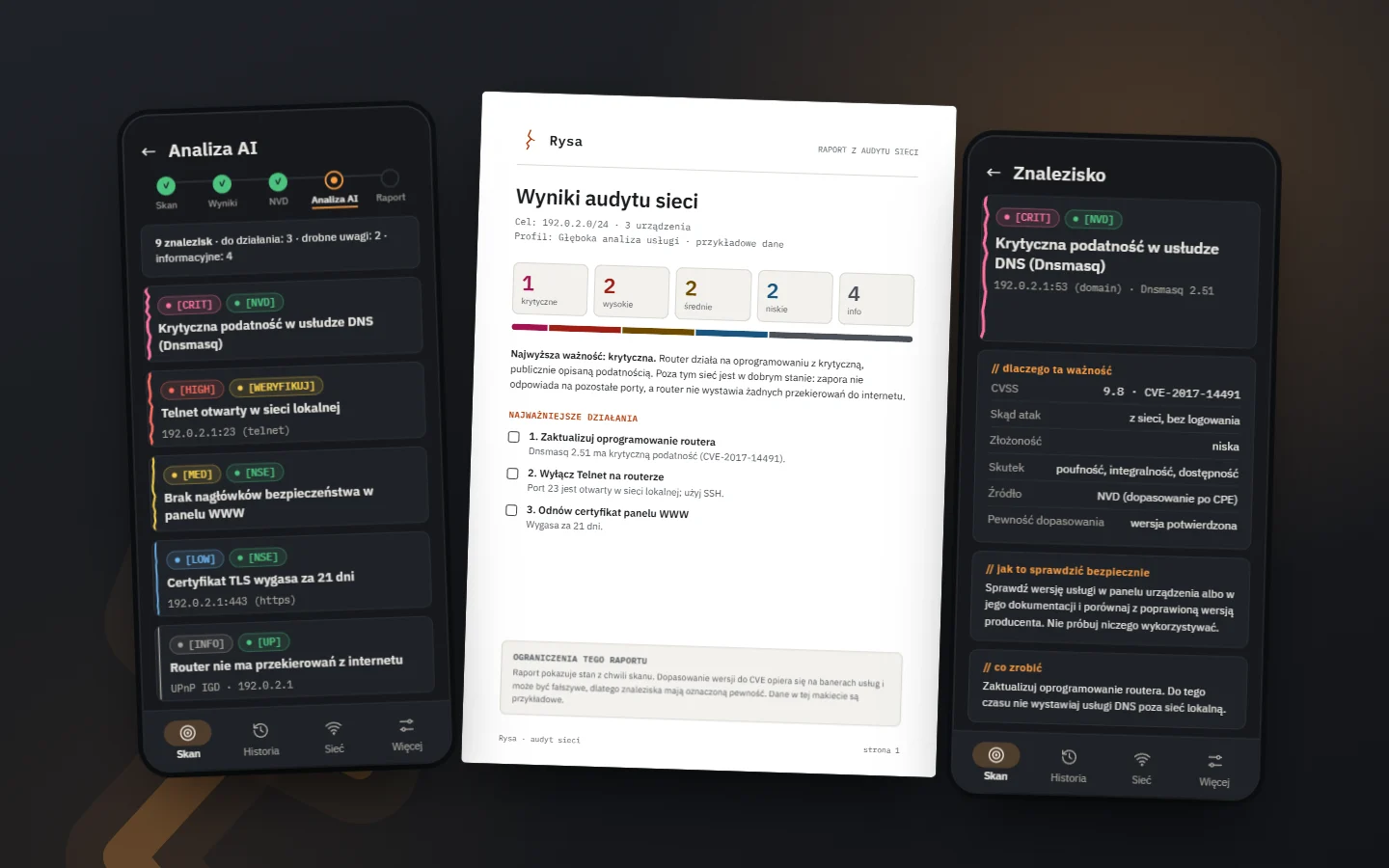
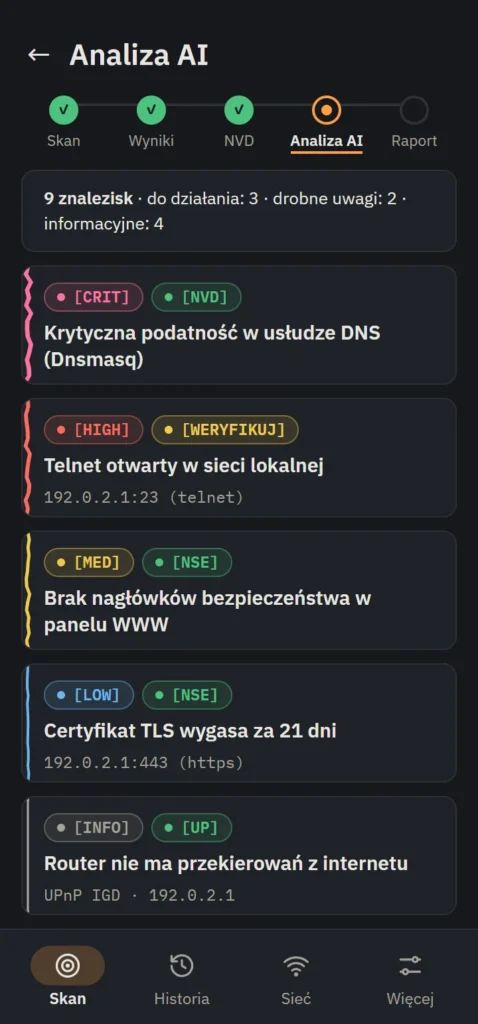
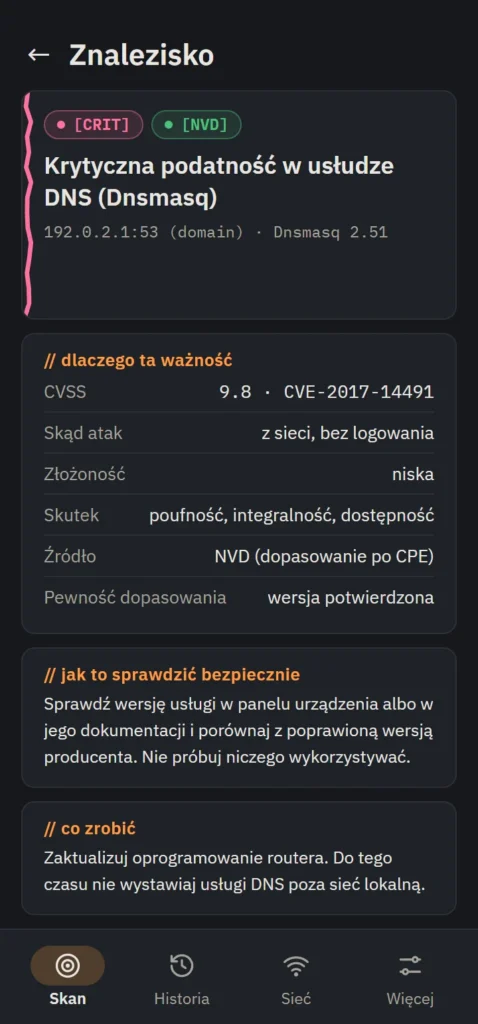
- Name and look: the working name “NetHunter Audit Companion” became Rysa, to avoid other companies' trademarks. Rysa is Polish for “crack” and the motif of the whole app: the more dangerous a finding, the deeper the crack on the edge of its card.
What it looks like
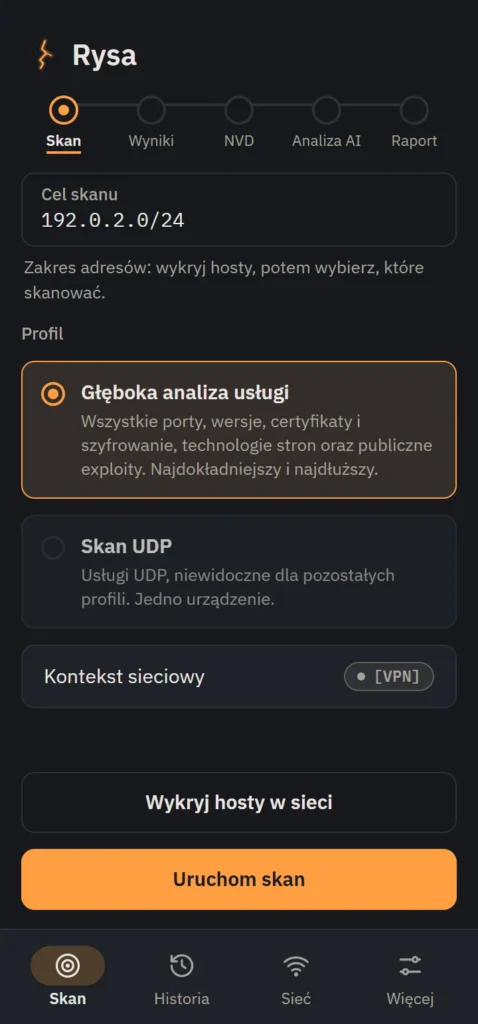
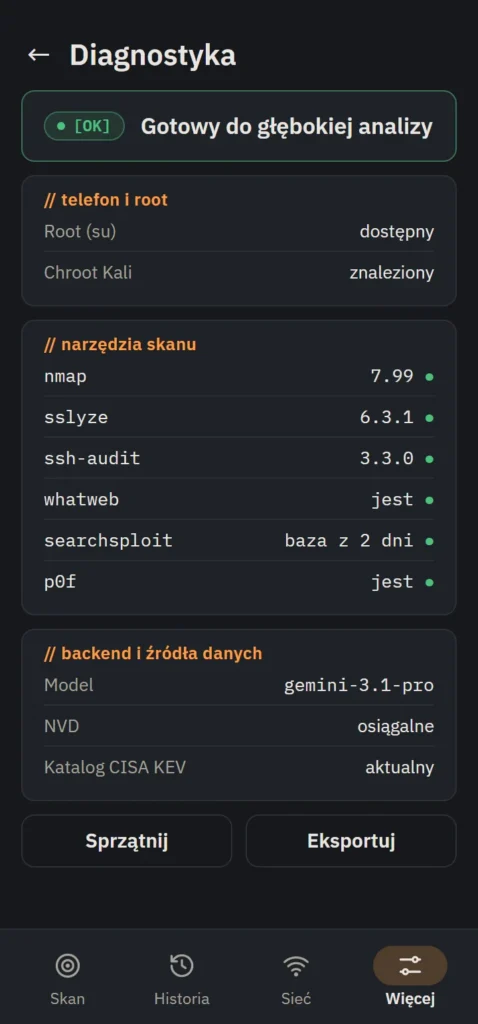
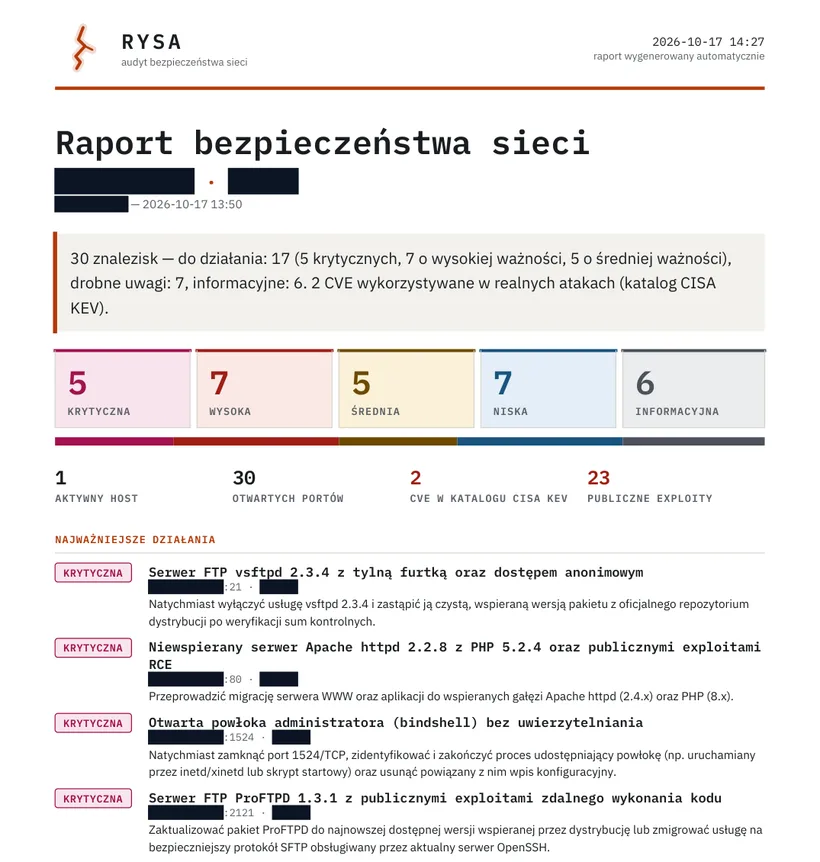
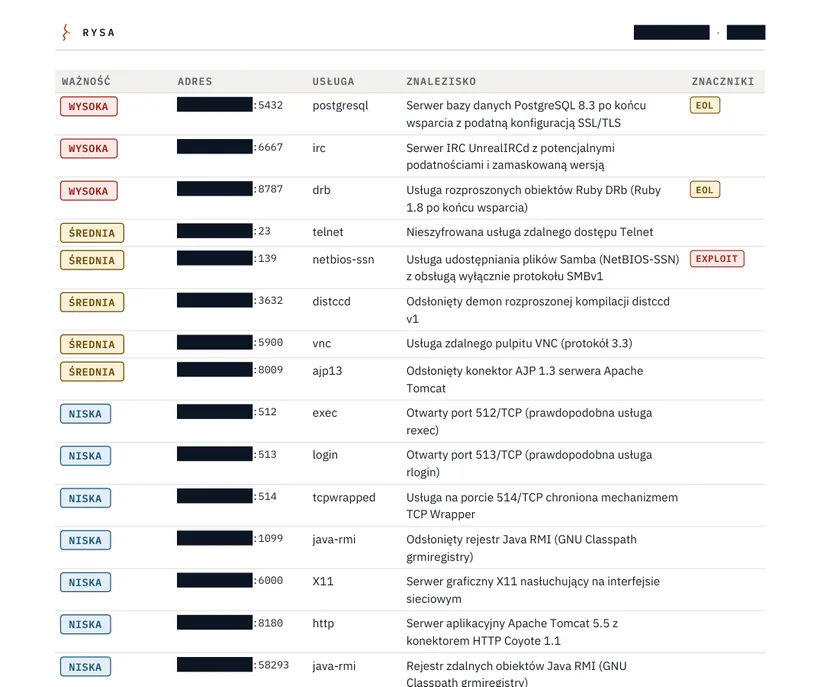
The first five images are mock-ups recreated from the look of the app, with sample data (addresses from the documentation range 192.0.2.0/24, invented device names). The last two are screenshots of a real report from a scan of Metasploitable 2, a deliberately vulnerable lab machine, with the addresses and host name masked.
What it can do
- nmap in Kali, on the phone. nmap with root privileges in the NetHunter environment on the phone, not in an emulator.
- Closed set of profiles and a target list. The “Deep service analysis” (all ports) and “UDP scan” profiles, with no field for arbitrary flags. A target outside the allowed list requires explicit confirmation that you have the right to scan it.
- Read-only layers. TLS (sslyze), SSH (ssh-audit), DNS (dig), website technologies (whatweb), OS fingerprint (p0f), router UPnP and the phone's Wi-Fi security. Zero login attempts and zero changes on the target.
- Correlation with NVD, OSV.dev and CISA KEV. The detected service version is matched against known CVEs (CVSS, flagging of vulnerabilities exploited in attacks) and against vulnerabilities in web libraries.
- Awareness of public exploits. Shows that an Exploit-DB entry exists, and never downloads or displays its content.
- AI explanation in Polish. Why it has that severity (with the CVSS vector explained in plain language) and how to check non-invasively whether it affects your device. Every finding is marked with its source and confidence level.
- Printable PDF report. A summary page with the three most important actions, a remediation plan (now, soon, when convenient) and a “what's fine” section. Changes since the previous scan and appendices follow.
- History with file backup. Scans saved locally, a combined report from several scans, export and import of history to a file. Import treats the file as untrusted and doesn't duplicate entries.
- A report with a remediation plan. The report opens with a summary and the most important actions. Then come a findings matrix, a plan grouped as now, soon and while you are there with checkboxes, the scan evidence, verification steps and a list of gaps in the reconnaissance. Rysa itself says a human has to confirm the findings.
- Pre-scan diagnostics. Checks root, the tools and the script database in the chroot, as well as the backend and data sources, before a long scan starts.
- AI analysis cost on display. Model calls and their cost in USD shown live (day, week, month), so there are no surprises on the API bill.
Technical details
- Platform: Android (root + NetHunter/Kali chroot required)
- App: Flutter (Dart), local history database
- Backend: Python (FastAPI) + Gemini 3.1 Pro, hosted separately
- Data sources: NVD, OSV.dev, CISA KEV, Exploit-DB (metadata only)
- Languages: Polish
- Internet: required for AI analysis and vulnerability databases; the scan itself runs locally
- Permissions: root (su), local network access
- Scope: auditing your own network, only infrastructure you have the right to scan
Privacy
The app shows that vulnerabilities and public exploits exist and where they are, never tools to exploit them. Before data reaches the model, the backend replaces IP addresses, the last parts of MAC addresses and known hostnames with placeholders, so the model doesn't see your network's addresses; the router's public address is also masked in the report. Scan history is stored locally on the phone, and when you export it, the app warns that the file contains network data. Every result is marked with its source (NVD, OSV.dev, model assessment) and confidence level, so a confirmed vulnerability isn't mistaken for a mere match by version number.