Services · Security
Application security
At work I test web applications against the OWASP methodology. I run the same checks on your website or app, find the gaps before someone else does and list them in order of urgency.
Scope
- Security audit and penetration testing: SQLi, XSS, authorization flaws and configuration
- Audit of an existing WordPress site: core and plugin versions checked for known vulnerabilities, user permissions and server configuration, including headers and backups
- A report in plain language, with priorities and a recommended fix for each finding
- A retest after the fixes, to confirm the gaps are closed
Who it’s for
- Businesses whose website collects data, such as forms, customer accounts and payments
- Owners of a WordPress site that has run on the same plugins for years without anyone checking it
- Before launching a new app, while fixes are still cheap
What I need from you
- Written consent from the system owner for the tests, with the scope described. Without it, I don’t test
- Test accounts for every role I’m supposed to check, for example a customer and an administrator
- Ideally a copy of the site for testing, and if we test the live site, a fresh backup
How an audit works
- Conversation and scope. We agree on what I test, from which accounts, when, and what I don’t check. The scope goes into the written consent for testing.
- Testing. I check the application against the OWASP Top 10: access control, injection (SQLi, XSS), login and sessions, plus configuration and known vulnerabilities in the versions used. Automated tools help, though the serious bugs are found by hand.
- Report. A summary for the business owner, the scope and method, then each finding with a severity rating (CVSS), evidence and a recommended fix, most urgent first.
- Walkthrough and retest. We go through the report together, and once the fixes are in, I check them again and confirm which gaps are closed.
I explain how to read a report like this and in what order to fix the findings in the article How to read a security audit report.
Sample report
What a report looks like: an example from Rysa
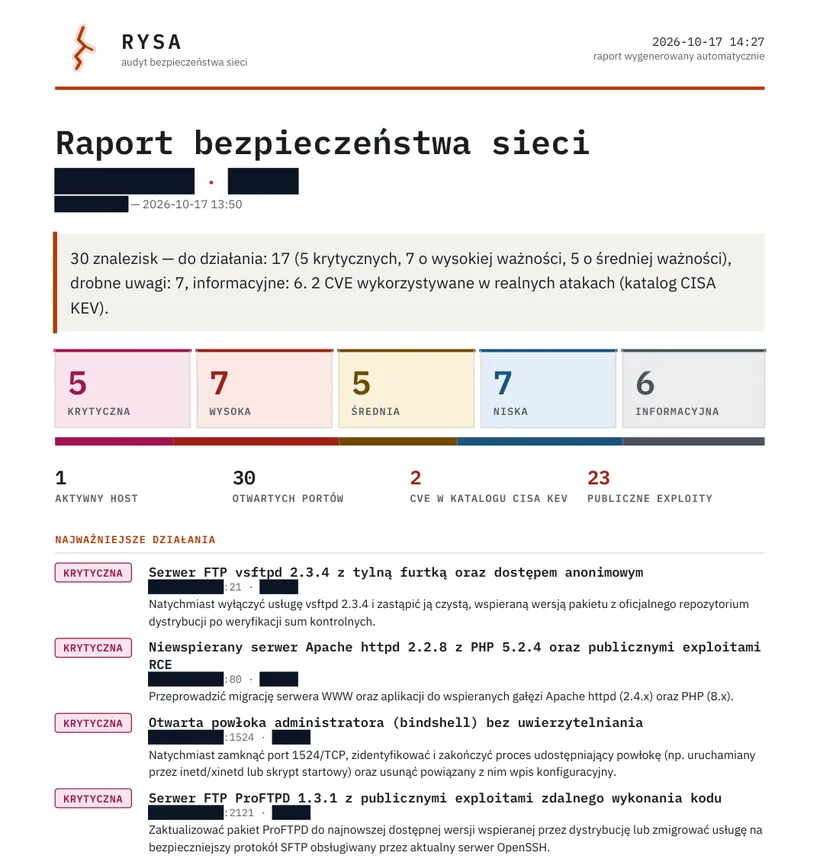
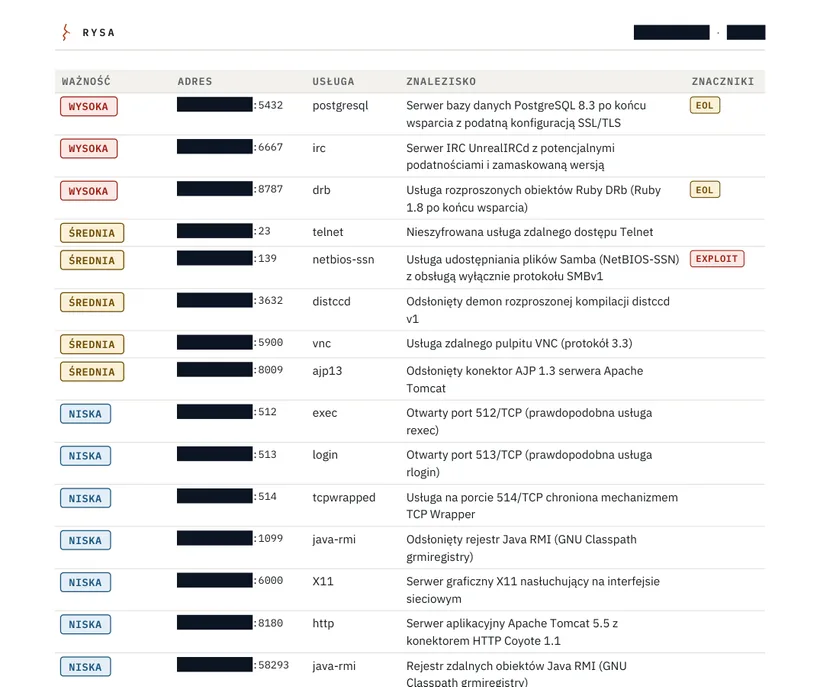
This is a report from my Rysa app, from a scan of Metasploitable 2, a deliberately vulnerable lab machine. It is an exercise in my own lab, with no client. Network addresses and the host name are masked.
- 30findings
- 5critical
- 7high
- 2CVEs in the CISA KEV catalog
- 23public exploits
- Summary. The number of findings by severity, CISA KEV entries, public exploits and the most important actions on the first page.
- Scope and method. What was checked and with what, how long the scan took and which layers ran.
- Findings matrix. Severity, service, description and tags (exploit, KEV, end of support).
- Remediation plan. One action per service, grouped as “now”, “soon” and “while you are there”, with checkboxes for tracking the fix.
- Evidence and verification. For each finding, the scan evidence, CVE numbers with a CVSS score and steps you can use to check it yourself.
- Gaps in the reconnaissance. What the scan did not check and how to confirm it. The report itself says a human must confirm its findings.
I describe Rysa in the case study. A report on a web application audit has a similar structure (described above), and the ratings and descriptions come from manual testing.
What the price depends on
The price depends on the size of the application, so I quote it after a short, free conversation. The biggest factors are:
- the number of user roles and what each of them can access,
- the number of forms, features and places where the application accepts data,
- whether the application has an API or integrations with other systems,
- whether it’s a standard WordPress site or an application written from scratch.
Questions and answers
How is an audit different from an automated scan?
A scanner will find outdated versions and simple, repetitive bugs. It won’t check whether customer A can see customer B’s orders, or whether a regular user can get into the admin panel. Access control flaws like these are the most common today, and they are found by hand.
Can testing break a live website?
It can, which is why a copy of the site is the best thing to test. If we test the live site, we make a backup first and agree on what I won’t touch, for example sending real orders.
Will you check a website you didn’t build?
Yes. I audit websites I didn’t build, WordPress sites included. Test accounts and the owner’s consent are enough; access to the code isn’t required.
What do I get at the end?
A report with the findings ordered by urgency, each with evidence and a recommended fix, then a walkthrough and a retest after the fixes. The summary is written for the business owner, the technical part for whoever does the fixing.
Can I check something myself first?
Yes. The article How to check if your website is leaking data describes seven checks that need no tools or technical knowledge. Only check a website that belongs to you.
See also: OWASP Top 10 without the jargon · How to read an audit report · How to secure WordPress · Rysa: a network audit app
Ready to start?
Let’s start with a conversation
Describe what you want to build. The reply contains the scope, the price and the timeline. The inquiry costs nothing and commits you to nothing.